Keyboard layers (Karabiner-Elements)
Status: Reference · Updated: 23 Sep 2026
Personal reference for my macOS keyboard setup, kept here so it travels with me. It is deliberately left out of the sidebar; search for keyboard to find it.
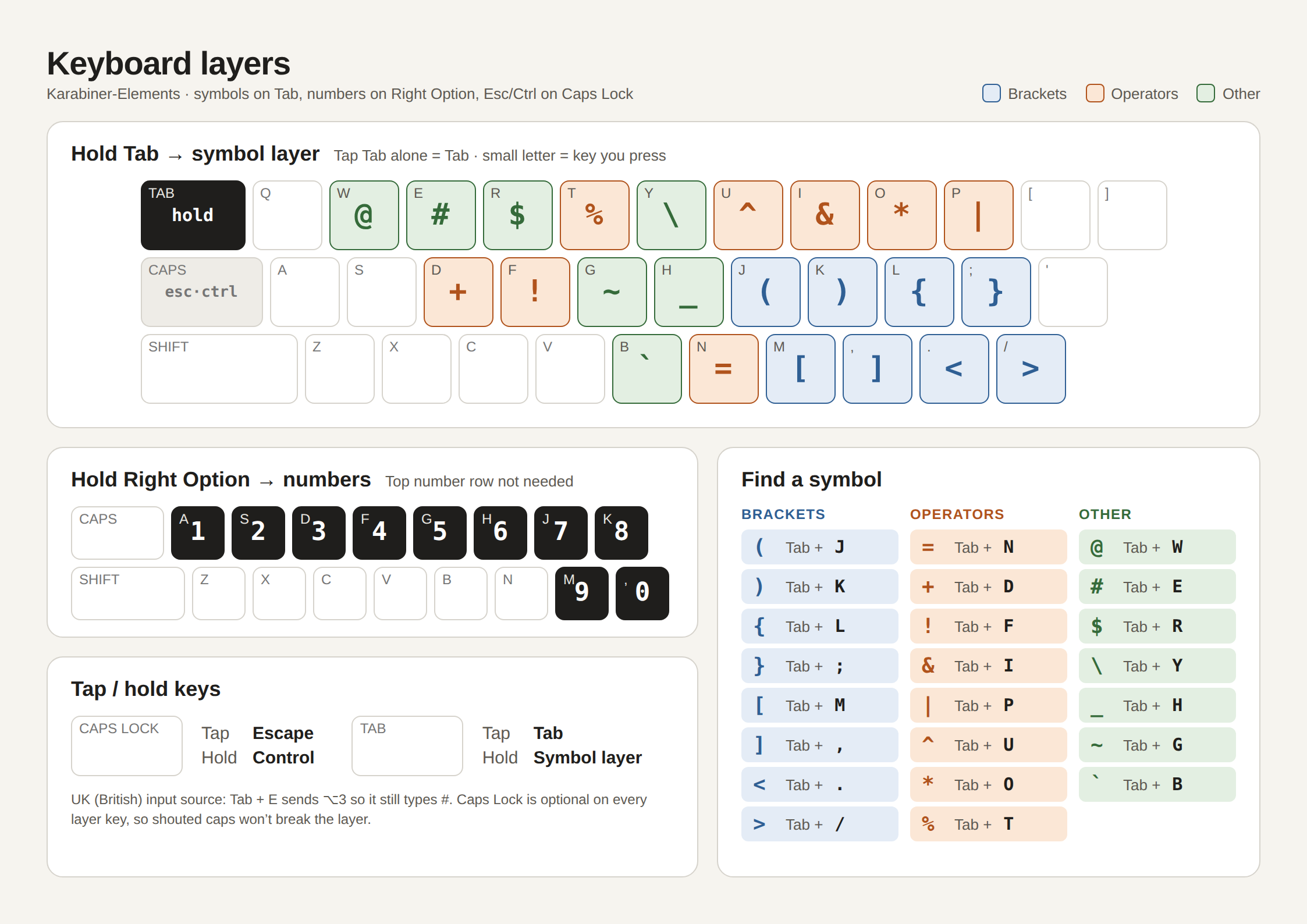
Three behaviours, all implemented as Karabiner-Elements complex modifications:
- Hold Tab for a symbol layer on the home rows. Tapping Tab still types Tab.
- Hold Right Option for numbers on the home row.
- Caps Lock taps as Escape and holds as Control.
Source of truth for the rules is the karabiner-symbol-layer repo. The files below are a snapshot of the design package from 23 Sep 2026.
Cheat sheet
Print-ready PDF (A4 landscape) Karabiner rules JSON
Symbol layer: hold Tab
| Row | Key | Output | Key | Output | Key | Output | Key | Output | Key | Output |
|---|---|---|---|---|---|---|---|---|---|---|
| Top | W | @ | E | # | R | $ | T | % | Y | \ |
| U | ^ | I | & | O | * | P | | | |||
| Home | D | + | F | ! | G | ~ | H | _ | J | ( |
| K | ) | L | { | ; | } | |||||
| Bottom | B | ` | N | = | M | [ | , | ] | . | < |
| / | > |
Grouped by category, as on the cheat sheet:
- Brackets: J
(· K)· L{· ;}· M[· ,]· .<· /> - Operators: N
=· D+· F!· I&· P|· U^· O*· T% - Other: W
@· E#· R$· Y\· H_· G~· B`
On the UK (British) input source, Tab+E sends Option+3 so it still types #. The rules cover both UK and US layouts.
Number layer: hold Right Option
| Key | A | S | D | F | G | H | J | K | M | , |
|---|---|---|---|---|---|---|---|---|---|---|
| Output | 1 | 2 | 3 | 4 | 5 | 6 | 7 | 8 | 9 | 0 |
Tap / hold keys
| Key | Tap | Hold |
|---|---|---|
| Caps Lock | Escape | Control |
| Tab | Tab | Symbol layer |
Setting it up on a new Mac
- Install Karabiner-Elements and grant it the input-monitoring permissions it asks for.
-
Drop the rules file into the complex-modifications folder:
mkdir -p ~/.config/karabiner/assets/complex_modifications curl -fsSL https://ganindu7.github.io/deepnotes/topics/utils/keyboard_layers/karabiner-rules.json \ -o ~/.config/karabiner/assets/complex_modifications/coding-layers.json - In Karabiner-Elements open Complex Modifications, click Add rule, and enable the three rules under “Coding layers (Tab symbols, Right Option numbers, Caps Esc/Ctrl)”.
For the full install with the keybr practice drills and launchd bits, clone the karabiner-symbol-layer repo and use its Makefile instead.
Files in this folder
| File | What it is |
|---|---|
| cheat-sheet.png | The visual reference above, A4 landscape at 2x. |
| cheat-sheet.pdf | Same design, print-ready. |
| cheat-sheet.html | Static HTML/CSS source of the design. Fixed size, not responsive. |
| karabiner-rules.json | The actual Karabiner rules in complex_modifications format. |
| keymap.json | Layers, triggers and key to output mappings as data. |
| design-tokens.json | Colours, fonts, sizes and spacing used by the cheat sheet. |