Using Git inside Docker
| Status: Draft | Updated: 17 Sep 2026 |
The goal: let a user (here will) clone, pull and push GitHub repositories from inside a container on a shared machine (the dgx) without leaving any credential on that machine, only while he has an SSH session open, and without having to restart the container every time that session drops and he logs back in (tmux users, this is for you).
The idea
The private key never leaves Will’s laptop. On login, ssh forwards the laptop’s agent to a fixed path on the dgx, ~/.ssh-agent/sock. Whatever is listening there can sign with his key but cannot read it. The container bind-mounts the ~/.ssh-agent directory and nothing else. When Will logs out the socket goes dead and the container loses GitHub access; when he logs back in, the socket is recreated at the same path and the same container works again.
Plain ForwardAgent yes is not enough for this: sshd puts the forwarded socket under a random /tmp/ssh-XXXX/ path on every login, so a running container (or an old tmux shell) keeps pointing at the previous, dead socket.
What not to do: generate a key on the dgx, or copy a key (or ~/.ssh) into a container or an image. On a shared host everyone in the docker group is effectively root and can read any container’s filesystem, and a key stored there outlives the session and has to be revoked by hand.
1. On the laptop: create a key and add it to GitHub
ssh-keygen -t ed25519 -C "will@example.com"
ssh-add ~/.ssh/id_ed25519   # macOS: ssh-add --apple-use-keychain ~/.ssh/id_ed25519
Give the key a passphrase. The agent remembers it, so you type it once per laptop session, and a copied key file is useless without it.
If you have a FIDO2 hardware key, ssh-keygen -t ed25519-sk makes a key that also needs a touch for every use, which is the strongest option here.
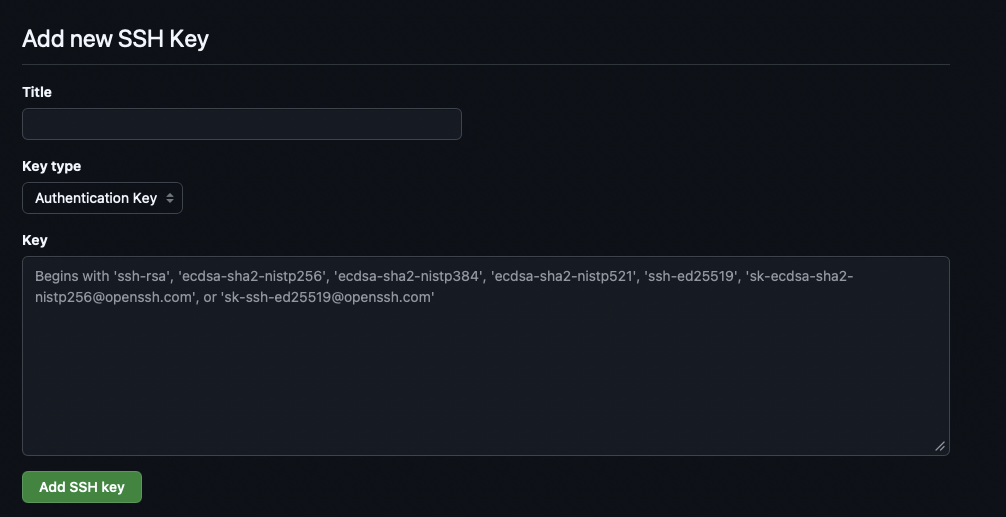
Then copy the public half (cat ~/.ssh/id_ed25519.pub) into the GitHub UI under Settings, SSH and GPG keys:
2. On the dgx, once: a fixed socket path
As Will:
mkdir -m 700 ~/.ssh-agent
echo 'export SSH_AUTH_SOCK=$HOME/.ssh-agent/sock' >> ~/.bashrc
As the admin, in /etc/ssh/sshd_config, then sudo systemctl reload ssh:
StreamLocalBindUnlink yes
Without this, the socket file left behind by the previous session blocks the next login from binding to the same path (you would see remote port forwarding failed for listen path).
3. On the laptop: forward the agent to that path, only for the dgx
# ~/.ssh/config
Host dgx
    HostName <dgx address>
    User will
    RemoteForward /home/will/.ssh-agent/sock ${SSH_AUTH_SOCK}
The remote path must be absolute (echo $HOME on the dgx if unsure). The one-off equivalent is ssh -R /home/will/.ssh-agent/sock:$SSH_AUTH_SOCK dgx. Now check from the dgx shell, including inside an old tmux session:
ssh-add -l              # lists the laptop key
ssh -T git@github.com   # "Hi will! You've successfully authenticated..."
No key files were created on the dgx. Only forward the agent to hosts you trust: while you are connected, root on that host can use the socket (it cannot extract the key). ssh-add -c on the laptop makes the agent ask for confirmation on every use if you want that extra check.
Set the identity git should use for commits (this is not a secret):
git config --global user.name "Will Example"
git config --global user.email "will@example.com"
4. The compose override: hand the socket directory to the container
Next to the project’s compose file add an override, e.g. /home/will/wills-sandbox/docker-compose.override.yaml (name it compose.override.yaml if the base file is compose.yaml). Compose loads it automatically, no -f needed, so the shared compose file stays untouched and everyone can keep their own override.
services:
  wills-sandbox:   # the service name from the base compose file
    volumes:
      - ${HOME}/.ssh-agent:/run/ssh-agent
      - ${HOME}/.gitconfig:/etc/gitconfig:ro
    environment:
      SSH_AUTH_SOCK: /run/ssh-agent/sock
Mount the directory, not the socket file. A bind mount of a file is pinned to the inode that existed when the container started, so the fresh socket a new login creates would be invisible. A directory mount shows whatever is in it now.
The container can be long-lived:
docker compose up -d
docker compose exec wills-sandbox bash
Inside the container:
ssh-add -l   # same key as on the dgx, still no key file anywhere
mkdir -p ~/.ssh && ssh-keyscan -t ed25519 github.com >> ~/.ssh/known_hosts
ssh -T git@github.com
git clone git@github.com:org/private-repo.git
Check the fingerprint against GitHub’s published SSH key fingerprints the first time. The known_hosts line is public information and can be baked into the image.
Notes
- Session dropped? Just
ssh dgxagain from the laptop. The socket is recreated at the fixed path and the running container, and any tmux shell, can push again. Ifssh-add -lsays it cannot open a connection to the agent, there is no live login behind the socket. - The most recent login owns the socket. Two parallel logins are fine, but when the newer one ends the older one does not take over; log in again.
- If you cannot change
sshd_config, keepForwardAgent yesand run a relay from your login shell instead:socat UNIX-LISTEN:$HOME/.ssh-agent/sock,unlink-early,fork UNIX-CONNECT:$SSH_AUTH_SOCK &(kill the previous one first). Same container setup. - Run the container as yourself so files you create in mounted volumes are owned by you:
export LOCAL_UID=$(id -u) LOCAL_GID=$(id -g)and adduser: "${LOCAL_UID}:${LOCAL_GID}"to the override. The socket is owned by you, so it still works. Some images assume root, so check that the tools you need still run. - Unattended jobs (no SSH session) cannot use a forwarded agent. For those use a fine-grained personal access token limited to the repositories needed, with an expiry, passed in as an environment variable, or a per-repository deploy key. Never bake either into an image.
- To revoke access, delete the key in the GitHub UI. Nothing needs cleaning up on the dgx or in any container.